Play Training
Set Campaign Dates
Number of Guide Steps: 3
Effectively managing campaign dates is a crucial aspect of campaign planning and execution in Vision VX. Properly chosen dates not only provide a clear timeline for campaign closure but also facilitate a seamless transition into the ordering process. Follow these steps to navigate through the selection of campaign dates:
The Significance of Campaign Dates:
Campaign dates serve as the temporal framework for your marketing initiatives, offering clear and measurable milestones. These dates are instrumental in not only closing campaigns but also initiating the subsequent ordering process, making them a vital component of your overall campaign strategy.
Align Dates with Expected Run Times:
It is highly recommended to align your selected campaign dates as closely as possible with the anticipated run dates of your campaign. This ensures a cohesive and well-timed execution that maximizes the impact of your marketing efforts.

- 1. Select Start and End Dates
- 2. Utilize Quick Date Buttons for Efficiency
- 3. Flexibility to Modify Dates
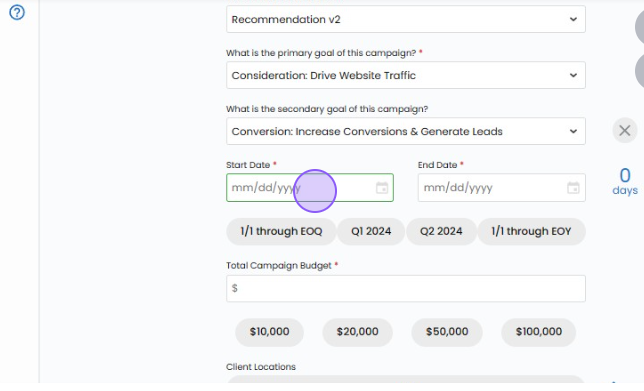
Select Start and End Dates.
On the campaign creation screen, explicitly choose the start date and end date for your campaign. This step provides a precise timeframe for your campaign's activation and conclusion, streamlining the planning process and facilitating better coordination with other marketing initiatives.
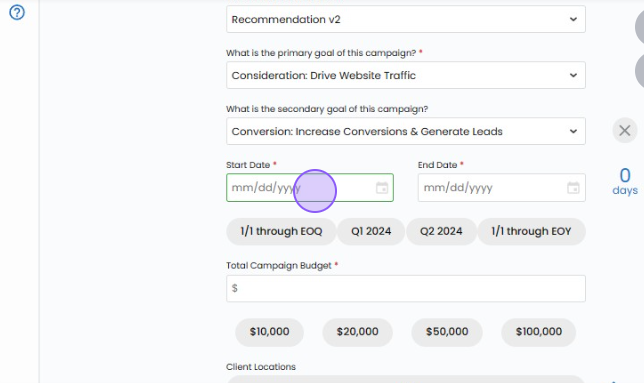
Utilize Quick Date Buttons for Efficiency.
For added efficiency, leverage the quick date buttons available on the campaign creation screen. These shortcuts allow you to swiftly add a date range without the need for manual input, expediting the process of defining your campaign's temporal parameters
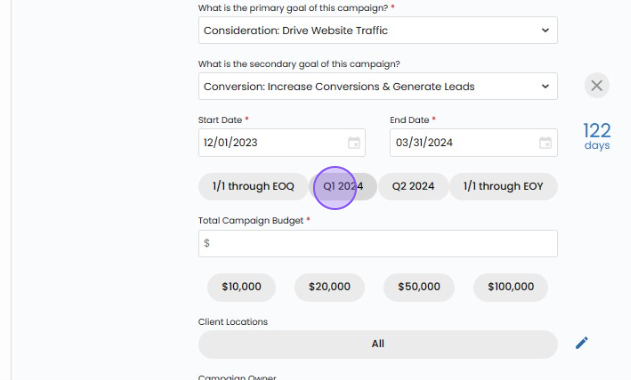
Flexibility to Modify Dates.
It's important to note that both the start dates and end dates of campaigns can be fully modified before the campaign order is submitted for billing. This flexibility enables you to make adjustments based on evolving campaign requirements or unforeseen circumstances, ensuring that your campaign timeline remains adaptable and responsive to changing needs.