Play Training
Order Changes
Introduction 7 of 10
Navigating Order Changes in Vision VX
Effectively managing campaigns requires a nimble approach, and Vision VX provides users with the tools to accommodate various order changes directly within the platform. These changes streamline the process, eliminating the need for extensive interactions with sales enablement or structural alterations to the order or line item.
 Related How To Guides:
Empowering Flexibility for Targeting, Creative, Conversion Changes
Changes Requiring No Approval:
-
Targeting Changes:
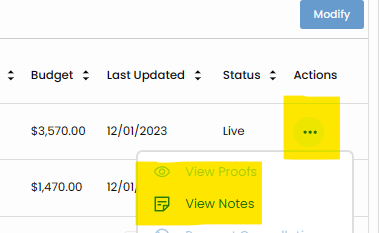
- Description: Adjustments to targeting parameters can be seamlessly requested within Vision VX for Titan-fulfilled products. Whether it's refining the audience or modifying specific targeting criteria, users can leverage the Actions and Notes functionality next to each product in the item list.
-
Creative Changes:
- Description: In the dynamic landscape of digital campaigns, the ability to tweak creatives swiftly is vital. Vision VX allows users to request creative changes directly within the platform. This ensures that the visual aspects of the campaign align with evolving strategies and requirements.
-
Conversion Changes:
- Description: Tweaking conversion strategies for optimal results? Vision VX enables users to request changes to conversions without the need for additional approvals. This flexibility ensures that campaigns can adapt to shifting priorities and objectives.
Changes Requiring Approvals:
However, certain changes have broader financial implications and affect how customers are invoiced for products and services. These changes necessitate a more structured approach and must be requested through Sales Enablement, following defined guidelines.
-
Budget Changes:
- Description: Adjusting campaign budgets involves financial considerations that impact invoicing. Requests for budget changes should be directed to Sales Enablement, allowing for a controlled and structured process to ensure alignment with financial guidelines.
-
Product Cancellations:
- Description: When a decision is made to cancel a product within the campaign, this has financial repercussions. Sales Enablement must handle requests for product cancellations to ensure proper documentation, adherence to financial protocols, and seamless coordination with the invoicing process.
Requesting Changes:
For Changes Requiring No Approval:
Utilize the Actions and Notes feature next to each product in the item list to request adjustments in targeting, creative elements, or conversions.
For Changes Requiring Approvals
Collaborate with your Sales Enablement Director to request changes related to budget adjustments or product cancellations. This ensures that the appropriate approvals and financial considerations are observed.
By providing a clear distinction between changes that can be swiftly implemented within the platform and those requiring a more structured approval process, Vision VX empowers users to navigate the intricacies of campaign management with efficiency and transparency.