Play Training
Submit to Billing
Introduction 3 of 10
The Final Step for Sales, Submit to Billing
The Submit to Billing step marks the penultimate stage, ensuring that all components are aligned for a seamless transition into billing and invoicing. This pivotal step involves a meticulous process that bridges the campaign's completion with the initiation of financial transactions and billing system entries.
 Related How To Guides:
Process for Sales, Submit to Billing Step
Confirm Completion
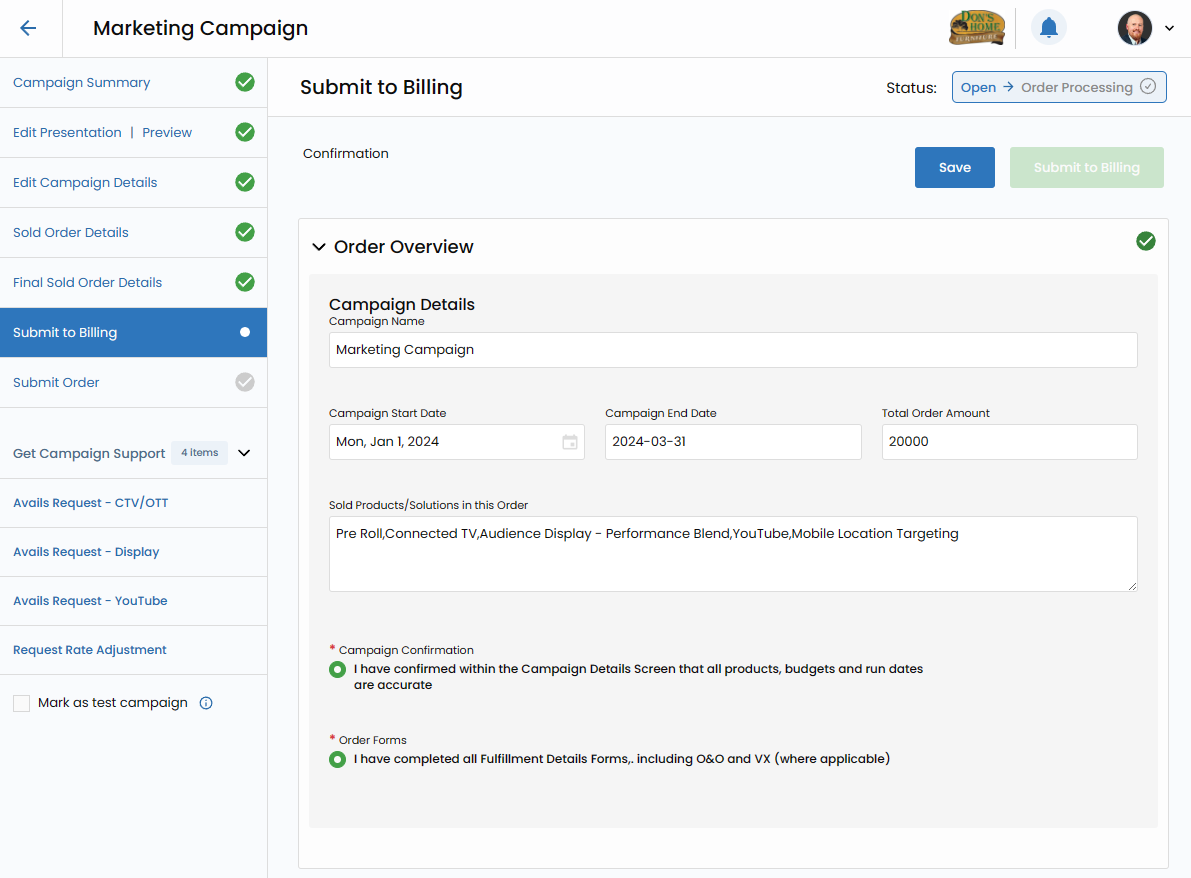
Before initiating the Submit to Billing step, it is imperative to verify that all information related to the campaign is complete and accurate. This includes rates, dates, impressions, quantities, and any other essential details.
Submission
Once satisfied with the completeness of the order, proceed to submit the order to billing within Vision VX. This action acts as a trigger, setting in motion the subsequent steps in the billing and invoicing process.
Sales Enablement's Role Post-Submission
1. Receive Your Order
The Sales Enablement team takes charge of the submitted order, receiving it as the precursor to the subsequent steps in the billing process.
2. Create Orders and Ads in Billing System
Leveraging the information from the submitted order, Sales Enablement creates corresponding orders and ads within the designated billing system. This step ensures that the campaign is accurately reflected in the financial records.
3. Confirm Customer Invoicing Details
A critical checkpoint involves validating that the customer invoicing details align seamlessly with the campaign specifics. This confirmation ensures accuracy and consistency in financial transactions.
4. Update Campaign Details Screen
Sales Enablement updates the Campaign Details screen within Vision VX with essential identifiers, including Customer #ID and Ad #ID. This linkage ensures a synchronized connection between the campaign's execution and its financial representation.
5. Update Campaign Details for Creative
Aligning the final portal order numbers for creative elements becomes a priority at this stage. Sales Enablement meticulously updates the Campaign Details, creating a comprehensive record of the campaign's journey.
6. Review Final Insertion Order (IO)
A comprehensive review of the Final Insertion Order is undertaken, ensuring that all details are accurate and reflective of the campaign's specifications. This step is crucial for maintaining precision and coherence in the billing process.
7. Submit for Go-Live (Into Titan)
The final stride in the billing process involves submitting the comprehensive details for Go-Live. This initiates the final phase of the campaign, ensuring that the fulfilled order goes live as intended.

In essence, the Submit to Billing step in Vision VX acts as a gateway to the financial culmination of the campaign. With Sales Enablement at the helm, meticulously navigating through each stage, this step ensures that the campaign's execution seamlessly integrates with the financial systems, laying the foundation for a successful and accountable campaign fulfillment journey.